
TNREGINET Firm Registration: Partnership Firm Route and Filing Basics
Use this page only when the work is really about a partnership firm. The first job is separating firm filing from society or other nearby services before you open the wrong branch and lose time in the wrong form.
Stay here for firm-route clarity, record readiness, and the basic filing path. This page does not replace society filing, broad business-registration explainers, or later support follow-up once the firm route is already clear.
Main owner page for partnership-firm route clarity, record readiness, and basic filing flow.
The first useful move is separating firm work from society work before any form details begin.
Support or Registrar follow-up makes more sense after the filing trail is already saved clearly.
Before doing anything else, separate the job clearly. A partnership-firm filing path is not the same as society registration, and it is not the same as broad business setup. That early split saves more time than jumping into the first menu that looks close enough.
If the firm request is already submitted and the real question is only acknowledgement progress or reference-based follow-up, use the TNREGINET application status guide first instead of treating it like a fresh filing problem.
When TNREGINET Is the Right Path for Firm Registration
The right use case here is partnership-firm registration work tied to the Registration Department service path. The question is not whether TNREGINET covers every kind of business setup in Tamil Nadu. The question is whether the user needs the firm-service route that belongs with partnership-firm registration and related follow-up.
That matters because the wrong starting assumption sends users in the wrong direction fast. A society route, an app search result, or a broad business-registration article can all look relevant at first glance, but they do not solve the same job.
Partnership firm registration versus society registration
Society registration and partnership-firm registration are close only at the surface level. Both sit inside the wider registration-service environment, but they do not belong to the same filing path. Society work belongs to the society or association side. Firm work belongs to the partnership-firm side.
That is why the firm page has to start with route clarity instead of form steps. If the user is handling an association, office-bearer filing, or society record, the society path is the better owner. If the user is handling a partnership firm, partner details, and a partnership deed, the firm path is the better owner.
| User situation | Better path | Why it fits better |
|---|---|---|
| Association or society filingUser is dealing with a society or association record, not a partnership-firm case. | Society route | Society filing and partnership-firm filing sit in nearby territory, but they do not use the same owner path. |
| Partnership-firm filingUser is working with partner details, the deed, and firm-side filing. | Firm route | This is the actual use case owned by the firm page and the right path to keep separate from society work. |
| Another nearby serviceUser only knows the topic looks business-related and has not identified the exact category yet. | Stop and classify first | The fastest way to lose time is opening a nearby service that looks close enough but does a different job. |
The clean split is simple:
- society route: association or society filing
- firm route: partnership-firm filing
- other routes: services that do not belong to either of those categories

Why app search is not the same as portal filing
The TNREGINET app is useful for visibility and service search, and it does list partnership-firm registration in the service universe. But the app itself is not the main filing route for registration work. The public app responses make that clear: search can happen there, while registration activity needs the portal.
That difference matters because some users see a firm-related item in the app and assume the whole process can stay there. The safer reading is narrower. The app can help confirm that the service exists, but the real registration step belongs on the portal-side route.
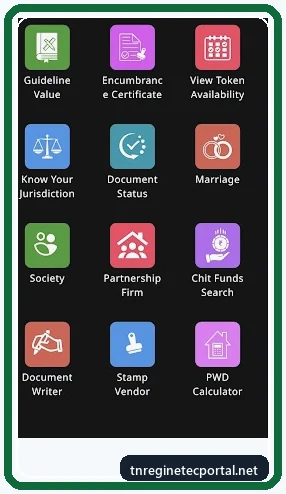
So the better first move is:
- use the app only if it helps confirm service visibility
- move to the portal when the real job becomes filing
- keep the firm route separate from society, chit-fund, and other nearby services
What Users Should Keep Ready Before Starting
The easiest way to avoid a broken start is to prepare the core firm records before opening the filing path. The goal here is not to collect every business paper that might exist. It is to keep the exact records that the firm-registration route is built around.
The strongest evidence found during research points to a small practical set: Form I, partner identity proof, and the partnership deed. Once those are clear, the portal-side path becomes easier to trust and easier to complete.
Form I, partner ID proofs, and partnership deed
The Tamil Nadu business-facilitation rules point to the core record group for partnership-firm registration. The items named there include the application for registration of firm in Form I, government-issued ID proofs of the proposed partners, and the partnership deed.
That matters because many users start from the wrong end. They open the portal first and only then begin wondering what the filing will ask for. The safer order is the opposite:
- confirm the work is really partnership-firm registration
- keep the Form I path in mind
- make sure partner identity proof is ready
- make sure the partnership deed details are already settled
The Gazette form also shows the kind of details users should expect to match properly, such as:
- firm name
- principal place of business
- other places of business if any
- partner details
- duration of the firm
Preparation rule
Do not treat this like a generic business form. The faster path is confirming the case is really a partnership-firm filing, then matching the deed, partner details, and Form I expectations before the portal form opens.
When reserved-word approval or matching partner details matter
The rules also mention a reserved-word approval order where it applies. That will not matter in every case, but it is one more reason not to treat the page like a generic small-business article. Some filings depend on naming or wording conditions that only make sense in the exact firm-registration context.
Matching partner details matter just as much. If the partner names, business address, or deed details do not line up properly, the user can lose time before the filing even settles into the right path. The practical rule is simple: if the same firm is being named in the deed, the form, and the identity-linked records, those details should read like the same case, not like three slightly different versions of it.
That is the real purpose of preparation here. It is not paperwork for its own sake. It is what keeps the filing path from turning into a correction problem later.
How the TNREGINET Firm Registration Route Works
Once the route and record group are clear, the next job is straightforward: open the correct firm-service path on the portal, move through the filing step carefully, and save the acknowledgement or result detail that proves what happened.
This is still not the place to overgeneralize. The page should not pretend every screen will always look the same. The safer message is narrower: use the correct portal-side route, read the live instructions on screen, and do not switch into a nearby service just because the menu looks similar.
Opening the correct firm service path on the portal
Start from the TNREGINET portal and look for the firm or partnership-firm service path that matches the task exactly. If login is required, use the correct account before going further. If there is no account yet, use the TNREGINET registration path first. If the user is still unsure whether the request belongs to a firm route or another category, fix that confusion before entering form details.
This is where the page should stay disciplined. The goal is not to explain every possible department path under the broader Tamil Nadu registration system. The goal is to move the user into the exact firm branch without losing time in society, chit-fund, or unrelated service sections.
The safer starting order is:
- open the TNREGINET portal
- confirm the route is for partnership-firm registration
- sign in if the firm path requires account access
- read the current instruction text before opening the form
- compare the requested details with the deed and partner records before submission
Submission flow, acknowledgement, and what happens next
After the correct firm route opens, users should expect a normal filing rhythm: enter the required details carefully, review the entries, submit the case, and keep the acknowledgement or reference detail safely. That acknowledgement matters because it becomes the bridge to later follow-up, correction, or office clarification if needed.
The process evidence also shows that this service belongs with the Registration Department side, not with a casual search tool. So once the request is filed, users should think in terms of record trail and follow-up, not in terms of repeating the first step again from scratch.
Mistakes that push users into the wrong service path
The biggest mistakes here are route mistakes before they become form mistakes. Common examples include:
- opening society registration when the real case is a partnership firm
- treating the app search result like the full filing route
- starting with incomplete deed or partner details
- assuming any business-related path on the portal is close enough
- submitting once without saving the acknowledgement or reference detail
Route mistake first, form mistake later
If the route itself is wrong, careful typing inside the form still does not fix the real problem. Make sure the case belongs to the firm path before any submission starts.
When the Case Stays Online and When Office Follow-Up Takes Over
Firm-registration work does not always end at the same point for every user. Some cases move smoothly through the portal-side filing path and only need the saved acknowledgement for later status tracking or reference. Other cases slow down because the route was unclear, the records do not line up properly, or a clarification step makes office follow-up more practical than repeated online guessing.
That is why the page should not promise a one-screen finish. The better promise is narrower: start in the right firm path, submit carefully, save the proof, and know when the case has moved beyond self-checking.
What proof to save after submission
After submission, the most useful thing to keep is the detail that proves the filing actually happened in the firm route. In practice, that means:
- acknowledgement number
- application or reference number
- submission date
- firm name as entered
- partner detail summary if shown on screen
- any visible result screen or portal message
The reason is simple. Once a case needs clarification, support, or office follow-up, memory is not enough. The saved submission trail helps show that the firm route was already used and that the next job is follow-up, not a blind fresh start.
When the firm route is clear but the case still needs support
Support or office follow-up becomes the better move only when the route is already clear but the result still does not make sense. That can happen when the user has the deed, partner details, and acknowledgement in hand, but the next step still looks blocked, unclear, or mismatched.
The better move is to stop repeating the same online action and shift into clarification. This is the point where users should keep the saved firm details ready and move toward the TNREGINET support path or the relevant Registrar-side follow-up instead of starting over in another service section.
Common signs that the case has moved past normal self-checking:
- the firm route is clear, but the next step is not visible
- the acknowledgement exists, but follow-up does not make sense
- the entered firm or partner details appear mismatched later
- the user is no longer sure whether the issue is portal-side or record-side
- retrying the same step is not producing a clearer result
TNREGINET Firm Registration FAQ
Short answers to common firm-registration questions
Yes. The strongest evidence in this project shows that partnership-firm registration belongs inside the TNREGINET or Registration Department service ecosystem. The important part is using the correct firm-service path, not assuming every nearby service on the portal does the same job.
No. The app can help confirm that a firm-related service exists, but the app responses make it clear that registration activity should be done on the portal. So the app is useful for visibility, while the filing path belongs on the portal side.
The safest starting set is the record group supported by the evidence: Form I, partner ID proofs, and the partnership deed. Users should also be ready to match the firm name, place-of-business details, and partner details cleanly before they submit anything.
Final Firm Route Rule
Best next step once the filing category is clear
If the work is really about a partnership firm, the right next step is to stay with the firm route, prepare the core records first, and file through the portal instead of guessing through nearby services. If the case is actually about an association or society, stop and move to the society page instead of forcing the wrong category to fit.
If the firm route is already clear and the records are ready, the portal-side filing path is the correct next move. If the route is still unclear, or the submission trail stops making sense even after careful checking, that is the point to move into support or Registrar follow-up with the saved acknowledgement and firm details in hand.
That is the main split to solve first. Decide whether the job is really a firm case, prepare the right records before the form opens, and then use the portal carefully while keeping the proof of submission. That order prevents most avoidable confusion later.
Use this final firm-route rule
- separate partnership-firm filing from society filing before any form work starts
- prepare the deed, partner details, and Form I expectations before opening the form
- save the acknowledgement or reference trail immediately after submission
- move to support or Registrar follow-up only after the route and saved proof are already clear
The page works best when the route is solved first and the filing trail stays easy to prove later.