
TNREGINET English and Tamil: Portal View and Font Clarity
Use this page when TNREGINET labels feel hard to read or when you need a clearer path through English or Tamil menus before choosing login, EC, guideline value, or another service.
Stay here for language-view choice, mixed-label clarity, and route selection. Tamil-font confusion usually comes from label rendering or a deeper service screen, not a separate portal. This page does not replace login help, app-only guidance, or broader support follow-up once language is no longer the real blocker.
Portal Rule
Start from the government .gov.in portal
Language Use
English and Tamil are part of one portal experience
English Benefit
Main menus become easier to follow
Read Carefully
Some deeper pages may still look partly mixed
Page scope
Stay here when the real problem is language or confusing labels. Move to the service guides only after you are sure which menu or screen you need.
Start With the Right TNREGINET Language View
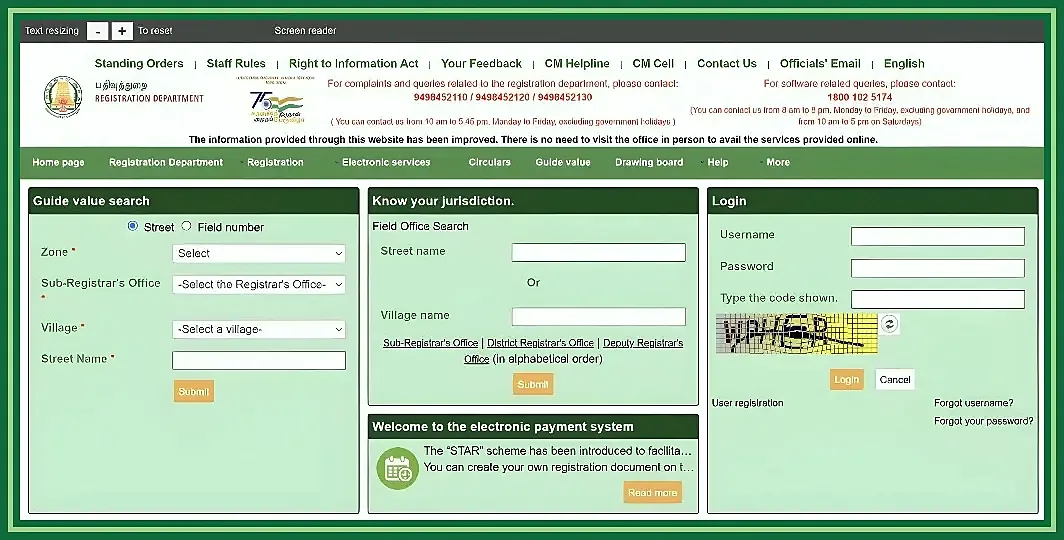
Start from the government website and work from the main menu. The most common mistake is simple: users open a guide page and think it is the place where the service itself runs.
Where users open the TNREGINET portal
The TNREGINET address is https://tnreginet.gov.in/portal/. Use that address for English access, Tamil access, login, registration, EC, guideline value, and the rest of the live services.
Third-party pages can explain things, but they are not the working government screen. If the address does not end in .gov.in, use it only for reading, not for doing the task itself.
Safe starting point
If the address does not end in .gov.in, do not treat it as the main working screen. Read it if you need help, then go back to the government site for the real task.
What to check before switching language on the portal
Before you assume the language view is broken, check the simple things first. Many users are not on the wrong language at all. They are on a deep service page, a guide page, or a screen with technical labels.
Quick checks:
- confirm the portal is the
tnreginet.gov.inwebsite - confirm whether you are on the homepage or already inside a service
- read the main service label before changing pages
- expect some technical terms to stay technical in either language
- keep your task clear: login, registration,
EC, guideline value, or another search
What language changes most
Language helps you read the menus. It does not create a different TNREGINET system.
How TNREGINET English Access Works
English mainly helps at the first layer: homepage menus, service names, login, and registration. Once you go deeper, some forms can still feel technical.
Where English labels appear on the main portal
English labels are easiest to follow in the main navigation, service menus, and account-entry points such as login and registration. That is enough to stop the guessing for many users.
The target is still the same government portal. What changes is the label view, not the service system underneath it.
English is especially helpful in:
Homepage menus and main service blocks
These are some of the easiest places to understand the portal in English.
Login and new-user registration links
Account-entry points are easier to recognize here than on deeper service pages.
Entry points for EC and guideline value
The starting route is clearer than the detailed search form that follows.
High-level buttons and next-step menus
These help users move to the correct screen without guessing.
That is the real value of tnreginet english: not a different site, just a clearer starting point.
Which sections still need careful reading even in English
Even in English, some screens still need slower reading. This happens most on older service pages and forms with administrative fields.
Slow down when you see:
- form fields related to district, village, street, or survey details
- jurisdiction and Sub-Registrar Office selection
ECand guideline value search inputs- instruction text shown inside deeper service pages
- screens where English labels exist, but the wording still feels partly mixed
Practical takeaway
If a page suddenly feels harder to read, do not assume you are lost. Check the service name, read the field labels again, and move one step at a time.
How to Use TNREGINET in Tamil
Tamil access helps many users read the site more naturally, especially at menu level. If Tamil is easier for you, start there.
Where users can expect Tamil labels and service names
Tamil labels appear inside the same government website, not on a separate Tamil-only site. You start from the same address and read the menus in the view that feels clearer.
Tamil-font confusion usually means the same portal feels harder to read. That does not mean there is a separate Tamil TNREGINET site or a different service path.
Tamil is most useful when you want to recognize the service quickly without translating from English first. That matters most on the homepage and the main service menus.
Main menu labels and service-entry names
These are some of the easiest parts of the portal to recognize in Tamil.
Homepage links to common services
The first layer of navigation gives the clearest Tamil guidance.
Buttons and headings for the next step
These help users move forward without guessing which service they need.
Service names in local administrative wording
Some labels feel clearer in Tamil because they match familiar local usage.
Tamil changes readability, not the service itself. Login, registration, EC, and guideline value still lead to the same functions.
Common Tamil-language navigation points users should recognize
Users do not need to memorize every label. It is enough to recognize the key paths that appear again and again.
The most important Tamil navigation points are the ones leading to:
- portal home and main service menus
- user login and new-user registration
ECor encumbrance-related search- guideline value lookup paths
- jurisdiction, district, village, or office-related search steps
Why this helps
Once those entry points are familiar, the rest of the site feels much easier to manage.
What Changes and What Does Not Change Between English and Tamil
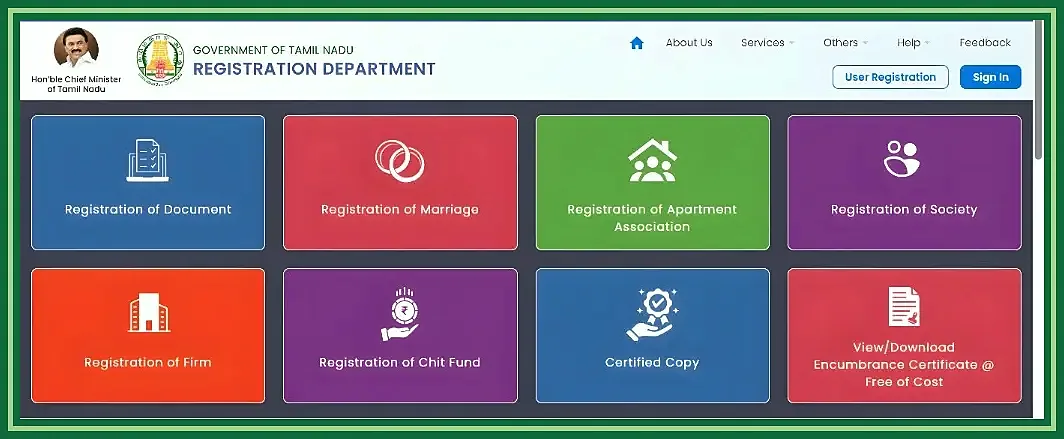
Many users expect English and Tamil to behave like two different TNREGINET versions. They do not. What changes most is the wording on screen.
Menus, service names, and form-field differences
Menu text, section headings, button labels, and some field descriptions can look different between English and Tamil. That is why one view can feel much easier than the other.
The service itself does not change. A user opening EC, guideline value, login, or registration is still entering the same path.
What changes
- menus and labels may look different
- how familiar a service name feels
- how easy some field descriptions are to understand
What does not change
- the service destination
- the search purpose or account path
- the need to read technical fields carefully
Simple rule
If the service route stays the same after you change language, that is normal.
Why some deeper screens may still feel mixed
Some screens feel mixed because not every part of the site uses the same style of labels. This happens most on older service pages, technical forms, and office-related field names.
Users notice this most when:
- they move from the homepage to an older service screen
- the screen uses administrative terms instead of simple everyday wording
- the field names are technical even though the main menu was clear
- a direct link opens inside a deeper service screen instead of at the top-level menu
What to do next
A mixed-looking screen does not always mean the site is wrong. In many cases, it only means you are deeper in the service. Confirm the service name, check the field purpose, and continue carefully.
TNREGINET Services Users Commonly Access After Language Selection
Once the labels make sense, most users move straight to the service they actually need. That may mean account access or a search-based tool.
Login and registration in the preferred language
After the menu looks clear, many users move to TNREGINET login or TNREGINET registration. Language helps you find the correct entry point, but it does not change how sign-in works.
The usual logic is simple:
- choose
registrationif you do not already have an account - choose
loginif you already have valid credentials - read OTP, password, and captcha fields carefully
- stay on the correct service page even if some labels look more technical than the homepage
Account-access reminder
If the account screen feels less polished than the homepage, that alone does not mean you are on the wrong page.
EC, guideline value, and service search after language setup
Many users do not need account access first. They need EC, guideline value, or another search path. Language only helps them reach the right service faster.
Common next steps after language setup:
Use this for the government reference value of a location before planning the next step.
Jurisdiction or office search
Use this when the next step depends on the correct Sub-Registrar Office path.
Broader service search
Some users move into document or registration-support menus once the language issue is settled.
Language helps you reach the right starting page. After that, you still need to read the service details carefully.
When users should move to the dedicated child pages
Solve the language issue here, then move deeper
Stay here if your main problem is language access. Move to the child pages once the label problem is solved and you now need help with the service itself.
- use the
loginpage for sign-in help or login issues - use the
registrationpage for full new-user signup guidance - use the
ECpage for encumbrance search steps and result meaning - use the guideline value page for location-based value lookup and planning
The goal here is to solve the language problem. The child pages should handle the service problem.
Common Language-Access Problems on TNREGINET
Even after users understand the English and Tamil views, two problems still come up: the site does not seem to switch cleanly, or a mixed-looking screen gets misread.
Portal not switching properly or opening confusing labels
When the site seems not to switch properly, the cause may be simpler than it looks. The user may have opened a deep link, landed on an older service page, or moved from a clear homepage into a more technical form.
Before assuming the portal failed, do this:
- reopen the homepage instead of relying on a direct deep link
- confirm they are still on the government
tnreginet.gov.inportal - check whether the confusion is coming from one service page rather than the whole portal
- read the main heading and service label again
- refresh and re-enter the path from the menu if the screen still looks inconsistent
What probably happened
In many cases, the language view did not fail. The user simply moved from a clear entry page to a more technical service screen.
TNREGINET Tamil font or broken-label confusion
The real issue is usually mixed label rendering, an older service screen, or a browser session that is not showing the same clarity as the homepage. It is usually a readability problem, not a different portal route.
Try this first
- go back to the TNREGINET homepage instead of staying on a deep service screen
- switch language again from the main menu
- open the same service from the menu instead of a copied deep link
- refresh in a clean browser tab if Tamil labels still look broken or mixed
English and Tamil navigation mistakes users make most
Most language-access problems are really navigation mistakes.
Using a guide page as the working portal
Users sometimes open a guide page and assume it is the real English or Tamil TNREGINET interface.
Expecting every page to feel like the homepage
Deeper service pages can look more technical even when the user is still on the correct screen.
Backing out too early
Users may leave a correct screen too quickly because one field looks unfamiliar.
Confusing wording with service logic
Language changes readability. It does not change the actual service result or purpose.
Practical fix
The fix is simple: identify the page purpose first, then decide whether the wording is really the problem or just part of a deeper service step. If the site still behaves oddly after careful retry, move to the TNREGINET support guide.
TNREGINET English and Tamil FAQ
Short answers for language access and portal use
Yes, at least at the navigation level. Users can stay on the same government site and use the English or Tamil view available there. If one screen still looks mixed, go back to the homepage and enter the service again from the main menu.
No. The main site may feel bilingual, but some deeper screens can still look technical or partly mixed.
No. Language changes readability. It does not change the underlying TNREGINET login, registration, EC, or guideline value path.
After the Language Choice, Move to the Right Service
Use this page for menu clarity, then switch to the page that owns the task
If you still need help reading the English or Tamil interface, stay here. If the menus already make sense and your real question is now about login, registration, EC, or guideline value, move to the dedicated guide for that service.
Use this quick rule
- go to the
loginorregistrationpage for account access - go to the
ECor guideline value page for search and service work - go to the
appor support page if the real issue is mobile behavior or broader portal trouble
Treat language as the first layer of navigation. Once that part is clear, move to the service-specific page and finish the task there. If the next problem is not language at all, switch to the page that actually owns it.